

Adding Custom UTM Codes to Your Newsletter
Edit in CMSOverview
Section titled “Overview”Letterhead now allows you to add custom UTM codes to your newsletters. This helps you track where your traffic comes from when subscribers click links in your email.
Using a dynamic value
Section titled “Using a dynamic value”A dynamic UTM value changes based on the subscriber’s data. You can do this by using Letterhead personalization (merge) tags.
For example, you can use a tag like {{CRMID}} as your UTM value. When the newsletter is sent, the tag automatically populates with each recipient’s unique data.
⚠️ Note Only Letterhead-supported merge tags can be used for dynamic UTM values. You can find the full list of available tags here.
Dynamic UTMs are especially useful for tracking subscriber-level engagement ,helping you see which subscribers clicked which links.
How to Add UTM Codes to Your Newsletter
Section titled “How to Add UTM Codes to Your Newsletter”Follow these steps to enable UTM tracking in your newsletter:
- Go to the “Preview and Schedule” step :
In your newsletter scheduling flow, open the “Preview and Schedule” screen. You’ll see a UTM Tracking section below “Send Test Email” . This appears for both new and existing letters. - Enable UTM Tracking:
Toggle UTM Tracking to ON. - Enter your UTM parameters
-
In the Key field, enter the UTM parameter key (e.g., utm_source, utm_medium, or utm_campaign).
-
In the Value field, enter a dynamic value using a merge tag without space (e.g.,
{{CRMID}})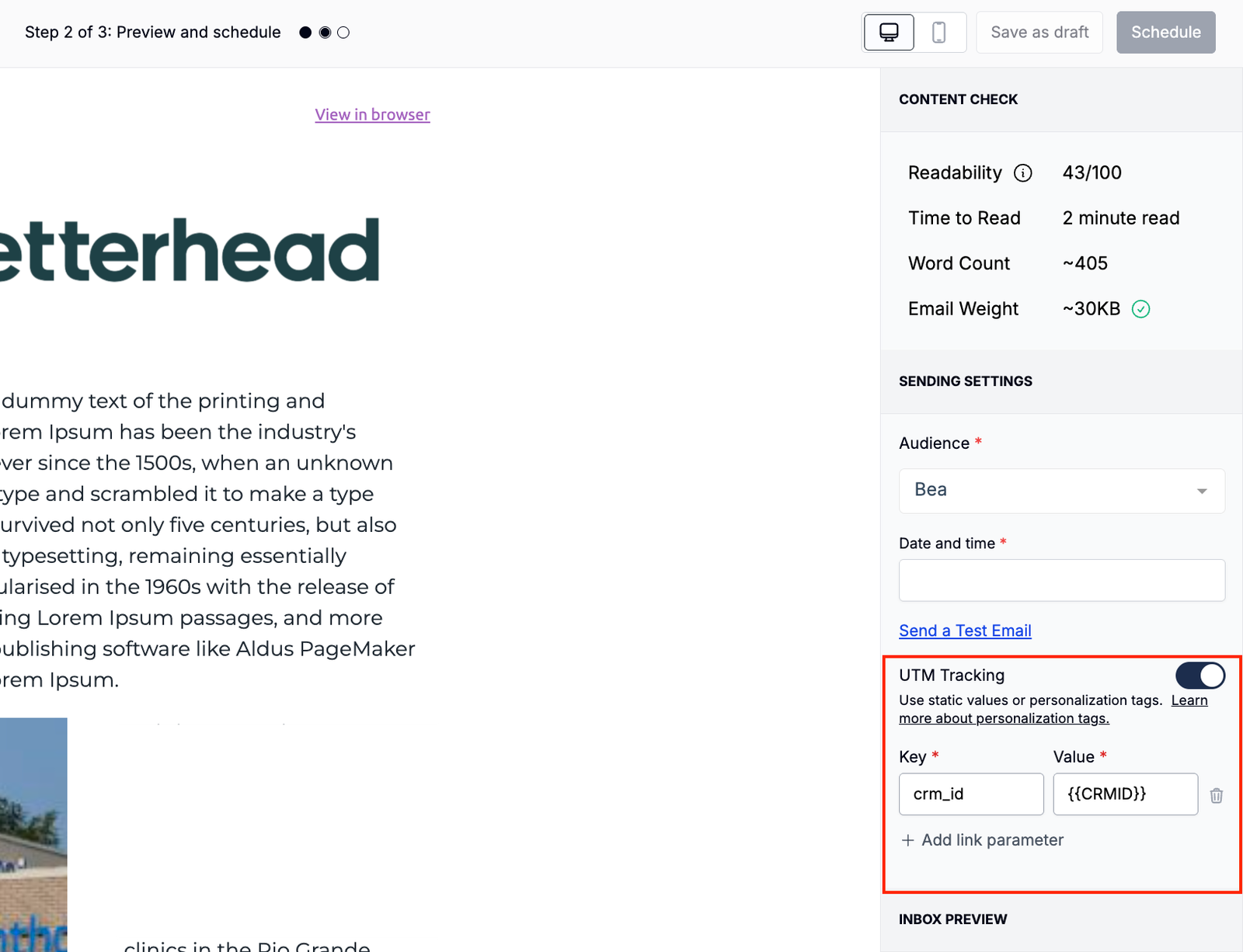
-
4**. Add multiple UTM parameters (optional)**
You can add more than one UTM parameter by clicking + Add link parameter.
5.Publish your letter
Once published, your UTM parameters will automatically be appended to every link in your newsletter as query strings (e.g., ?utm_source=newsletter&utm_campaign={{CRMID}}).
Example
Section titled “Example”If you set:
- Key: utm_campaign
- Value:
{{CRMID}}
Then the final link in your newsletter might look like this:
https://example.com/article?utm\_campaign=12345
(Here, 12345 is replaced dynamically with the subscriber’s unique CRM ID.)
Why Use Custom UTMs?
Section titled “Why Use Custom UTMs?”Custom UTM tracking lets you:
- Measure traffic from specific newsletters or campaigns.
- Attribute clicks to individual subscribers (with dynamic tags).
- Better understand engagement and marketing performance.
Still can’t find what you need? Contact support.