

What does the Links check flag before you send?
Edit in CMSA broken link is the kind of mistake nobody catches until a reader does — the email looks perfect, the send goes out clean, and then someone clicks a headline and lands nowhere. The Links check clicks through your edition for you, before you send.
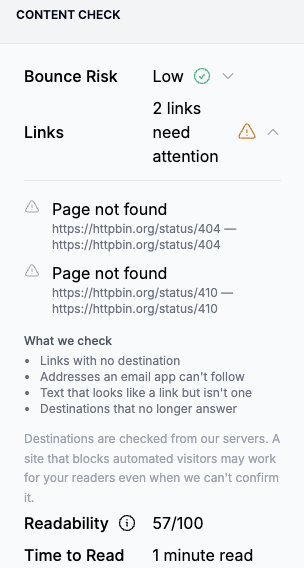
You’ll find it as the Links row in the Content Check section of the right-hand panel when you click Preview and schedule. If everything works, it reads No problems found. If not, it counts how many links need attention.
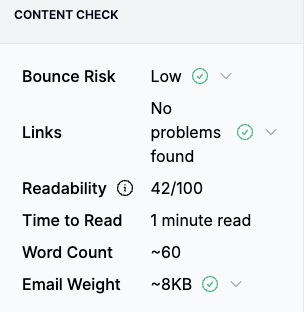
Click the arrow next to the reading to open it. You’ll see each link that needs attention, with its text and destination so you can go straight to it in your draft, followed by a short What we check list of everything the check looks for. The list is there even when nothing was found, so you can always see what was tested.
This is an early access feature, so you may not see the Links row yet — contact Letterhead support if you’d like it enabled for your account.
What the check looks for
Section titled “What the check looks for”It checks two different ways a link can fail a reader.
Links written wrong
Section titled “Links written wrong”These are problems in the draft itself, caught instantly:
- Link has no destination — the link exists but points nowhere. Clicking it does nothing.
- Destination isn’t a usable web address — what’s behind the link isn’t something an email app can open.
- Destination is missing https:// — an address like
example.com/storywithout thehttps://in front works in a browser bar, but inside an email it goes nowhere. - Looks like a link but isn’t one — text painted in your newsletter’s link color that carries no link at all. To a reader that’s a promise: they’ll click it, and nothing will happen.
Destinations that don’t answer
Section titled “Destinations that don’t answer”It also visits every web address your edition links to and reports what it finds:
- Page not found — the page has been taken down or the address has a typo. This is the classic broken link.
- Site returned an error — the page exists but the site is failing right now.
- Site took too long to respond — the site didn’t answer in a reasonable time.
- Site could not be reached — the address doesn’t lead anywhere at all, often a misspelled domain.
Visiting every destination takes a moment, so you may briefly see Checking links… while it works through them. Results are remembered, so the same destination isn’t re-tested every time you open the panel.
What it doesn’t flag
Section titled “What it doesn’t flag”- Web addresses written as plain text. If you type an address into a sentence without linking it, that’s not an error — readers don’t expect to click plain text, so there’s nothing to check.
- Sites that block automated visitors. Some sites turn away anything that isn’t a person in a browser. The check can’t confirm those destinations, but they usually work fine for your readers — so it stays quiet rather than crying wolf. The panel says as much: Destinations are checked from our servers. A site that blocks automated visitors may work for your readers even when we can’t confirm it.
It advises, it never blocks
Section titled “It advises, it never blocks”The Links check is a heads-up, not a gate. A finding won’t stop you from scheduling or sending — sometimes you know better than the check does, like when a page is about to go live alongside your send. The reading refreshes when you save, so once you fix a link it reflects the version you’re about to send.
It looks at whether your links work. For how they look — colors, underlines, and why a link can render differently in the inbox than in the composer — see Link styling in your newsletter.
Still can’t find what you need? Contact support.